Key Takeaways
Webflow is SEO-friendly, but rankings depend on execution.
SEO principles are the same across platforms but implementation differs.
Technical setup, indexing, redirects, schema, and mobile performance matter.
Strong on-page SEO starts with intent, structure, content depth, and internal links.
CMS pages need unique metadata, clean templates, and useful content.
Off-page authority, reviews, backlinks, and brand mentions support trust.
AEO, GEO, and AI visibility extend SEO; they do not replace it.
Many people misunderstand the term, 'Webflow SEO' as a SEO method which is specifically designed for Webflow websites only. No matter how you build your website, let that be through custom coded, Webflow, Framer, WordPress or Shopify, the SEO fundamentals are same for all.
Your websites won't rank if your SEO setup comes with poor technical SEO, on page SEO, off page SEO or not answered well for AI visibility. Now, traditional SEO have extensions such as AI Overviews, AEO, GEO and AI visibility in LLMs.
You will get a thorough guide here for your Webflow website SEO in 2026 and rank in the SERP.
Complete SEO Guideline for Webflow Websites in 2026
Grab your coffee, because now we are going to dive deeper into all terms and steps you need to know and do in your Webflow SEO. We are coming up with guidelines on technical SEO, on page SEO, off page SEO, AI in SEO, E-E-A-T in 2026 and much more.
Is Webflow Good for SEO?
Remember anything else, you need to know that Webflow does not give you the benefit of ranking automatically in search engines. Webflow is just a website builder through which you can do web design and web development, not a SEO tool itself. So, yes, Webflow is obviously good for SEO if your website is planned, built, optimized and maintained correctly.
Is Webflow SEO Different from other Website Builders?
The SEO principles are same for all the Webflow alternatives, such as Framer, WordPress, Shopify or custom coded websites. All websites need crawlable pages, indexable content, clear URLs, helpful content, internal links, fast loading, then device optimized trustworthy signals. Implementation on each website builders might be a little different, such as WordPress SEO works with plugins or else everything works in the same way.
E-E-A-T Guideline Before Learning SEO
Experience, expertise, authoritativeness, and trustworthiness is what E-E-A-T means in Google. It's the quality standard which you must maintain in your business to help your audience and search engines believe you.
But, please don't mistake it as a ranking factor only, it is the overall system how you structure your website, write your blog contents, and maintain other social media platforms.
You show your experience with real images, screenshots, project examples, case studies, before and after results, original research and more. In short, you share your real experience on the niche and topic with the audience, then search engines take it as a trustworthy signal.
You can show your expertise through using niche or topic terminology, explaining problems and solutions, and knowledge. Explain limitations of something, what works, what doesn't work, and why and etc.
Showing authoritativeness means you are a reliable source in your niche. And also, you have backlinks, brand mentions, guest contributions, original research, templates and tools, community participation. More like, visible and trusted in social media platforms with reviews and testimonials.
Increase your trustworthiness by clearly mentioning who wrote the blog, how to connect with your business, then when was your content last updated. Also, you have to include clear and authentic About, Contact, Privacy Policy, Terms and Conditions pages in your website to earn trust.
Technical SEO for Webflow Websites
The website builder Webflow provides you full control over technical SEO. But for that to work your website architecture, URLs, sitemap, canonicals and mobile experiences needs to be perfect.
Important Technical SEO Glossary to Know
Before jumping into the in-depth technical SEO guide, you must know a few terms before hand for better understanding.
1. Crawling
Crawling is the first stage, it's called the discovery stage of web pages in search engines. It means, search engines find your pages through internal links, sitemaps, external backlinks, and more. Sitemaps are important, as it helps search engines to discover URLs, but it's not enough, if your page have weak content or poor structure. Redirects also matter because if you change page slug, then proper 301 redirects will help you to create new URL instead of a broken page.
2. Indexing
In the next stage is indexing, it decides if your page should be eligible to appear in the SERP or not. But remember, your page might not be also indexed due to some important issues. If your content is of low value, thin, duplicate, marked no index, blocked by robots.txt, poor internal links or fully AI written without human edit.
3. Ranking
Ranking is when the search engines decide if your indexed pages deserve visibility for a query in the SERP. It depends on relevance, search intent match, content depth, technical health, page experience, internal linking, backlinking, E-E-A-T, brand authority and user satisfaction. Your page content must answer the keyword query, load quickly, be helpful to rank competing with the competitors.
4. AI Overview and Visibility in AI Platforms
Now, AI overviews, AEO, and generative search changed how information is displayed, but this doesn't mean SEO is dead, it's a new version only. Whatever SEO tasks you do on your website, you must have to keep doing it, no matter what AI updates are happening or coming. Because now, beside ranking in SERP, we have to rank in AI overviews in search engines as well with our content.
Most importantly, another thing is, we have to focus on SEO more than before due to getting visibility or recommendation from AI platforms for queries.
How to Do Technical SEO in Webflow Websites?
Thoroughly keep reading all the things you must do in technical SEO for your Webflow business websites.
1. Site Architecture
A successful Webflow website must be structured very well for the users and the search engines. The homepage of your website must introduce your brand, explain the core value and link the important sections clearly. Service pages, product pages, blog, category pages, contact, about, legal, all these pages must have a logical place in your website.
Your goal is not to create pages only, but to connect them properly as well. Because if a high value page is buried with no internal linking then search engine won't treat it well, and your users may not find it.
2. URL Structure and Slugs
Your URLs must be short, readable, lowercase and yet descriptive in the Webflow websites. Please, avoid adding random IDs, dates, keyword stuffing or any irrelevant words in the URLs. Clean URL will help your users understand the page before they click and it gives search engines signal about page relevance.
Another important thing, don't change URLs after publishing unless there's a SEO or UX reason to fix. Add a 301 redirect from the old URL to the new one for the slug change.
Example of a good URL - https://grabui.com/blog/webflow-medical-website-templates
3. XML Sitemap
Through sitemap, search engines will discover URLs on your Webflow website, moreover, Webflow can auto generate a sitemap file and update when your site is published. However, for localized websites in Webflow, the auto generated sitemap includes hreflang information for static and dynamic pages.
Remember to include useful and index worthy pages in the sitemap for appearing in the SERP. And exclude the pages which are thin, duplicate, test based or providing low value to the users, then submit your sitemap in the Google Search Console. After that, Google will discover the URL through your sitemap but it doesn't guarantee you indexing.
4. Robots.txt
The robots.txt file will tell the crawlers which pages of your website it can or can't access. Robots.txt can be configured from the SEO indexing settings in Webflow, useful when you want to give access to specific folders and pages to crawlers.
Remember to use robots.txt carefully, never block the important CSS, JavaScript, images or pages which Google needs for understanding your website. However, a blocked URL can also appear in the SERP, if your other pages are linked to it.
5. Noindex Settings
If you want a page to not appear in search results then use noindex setting. In Webflow, if you disable sitemap indexing for a static page or CMS item, it can add a noindex meta tag and remove your page from sitemap. The common noindex pages are thank you page, test page, duplicate landing page or internal campaign pages.
6. Canonical Tags
Through canonical tags search engines understand the preferred version of duplicated or similar pages in your website. For example, your Webflow marketing website might have URL variations, similar landing pages, CMS duplicates, so the canonical will point the strongest version for SERP.
7. 301 Redirects
301 redirects will help you when you change URLs, migrations, slug changes, deleted pages, consolidated content or backlinks pointing to old URLs. Through Webflow, you can do page level redirects and bulk redirect import or export, which is useful for large migrations. So, before you launch, export old URLs, or mapping all old URL to new destination, avoid redirect chains, test redirects and monitor 404 errors in Search Console.
8. 404 Page Optimization
404 page comes in a website when a URL is no longer existing, and must explain the issue and help users continue instead of leaving. In Webflow, you will find 404 page in default utility page, but you must design it intentionally.
9. Mobile SEO
Technical SEO also includes the mobile version of content for indexing and ranking, so your Webflow websites must be mobile first. Review responsive layouts, mobile menus, font sizes, forms and most importantly mobile page speed for all types of websites in Webflow. Your mobile version should not hide essential content which exists on the desktop version in your website. Also check your image optimization, core web vitals, tap targets, for proper Webflow mobile SEO.
10. Schema Markup
Schema markup is the structured data that will help the search engines to understand the meaning your pages more clearly. It will describe your page type, business information, authors, products, reviews, breadcrumbs, FAQ and other entities.
In your Webflow website, you can add schema through adding JSON-LD schema by:
page level custom code
site wide custom code
CMS page custom code,
schema generators, or manual JSON-LD.
Test your schema with the Schema.org validator, and the Google Search Console reports. This checking will help you to find out broken JSON-LD, then required missing properties, or unsupported formats, and more.
On Page SEO for Webflow Websites
Through on page SEO, you can connect search strategy with the actual content and structure of the your pages. The technical SEO will help search engines to access your website. But the on page SEO will tell the search engines what your page is about, who it's for and why it should rank.
1. Keyword Research
Even before writing a single word in a blog, the first step is the keyword strategy. Through keyword strategy you will get your primary keyword, secondary keywords, and clear understanding of the search intent. Search intent is a very important thing than just adding keywords, because it will help your page with title and headings.
You must include SERP analysis, related questions, competitors gaps, commercial and informational intent, and long tail AI style questions for keyword research.
2. Keyword Mapping
Keyword mapping helps your each page to have one clear purpose, and not compete for the same query. For example, your homepage must focus on the brand and core values, service page should target your service keyword, or a comparison page targeting alternative intent. This mapping organization in keywords will keep your site clean and help search engines to understand page topic.
3. SEO Titles
To make a title strong and SEO optimized include the main keyword naturally without any punctuation in it. Avoid using clickbait titles or duplicate titles in your website for sustainable growth, no avoid keyword stuffing as well. The title of your blog or any pages should be short, and attention grabbing matching your keyword intent.
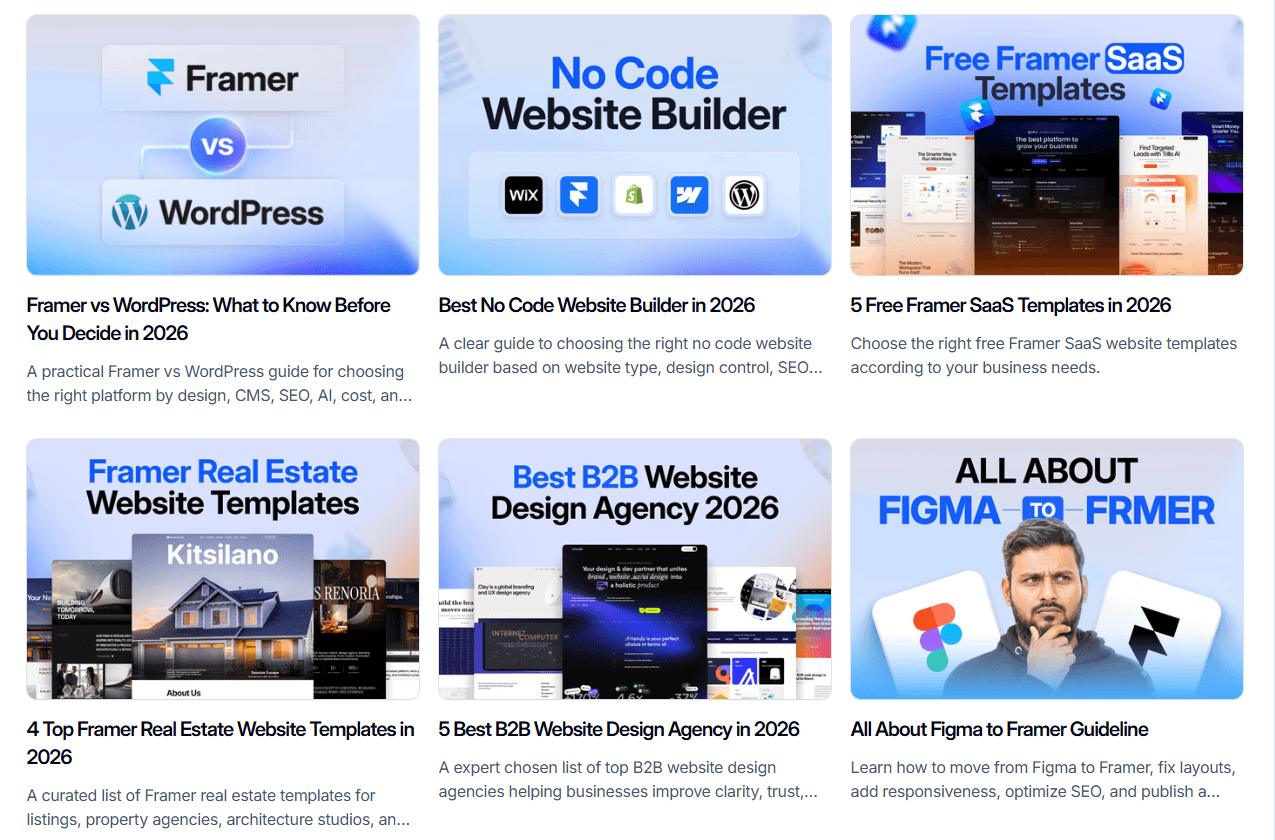
Here are a few SEO optimized title examples from our website.
4. Meta Descriptions
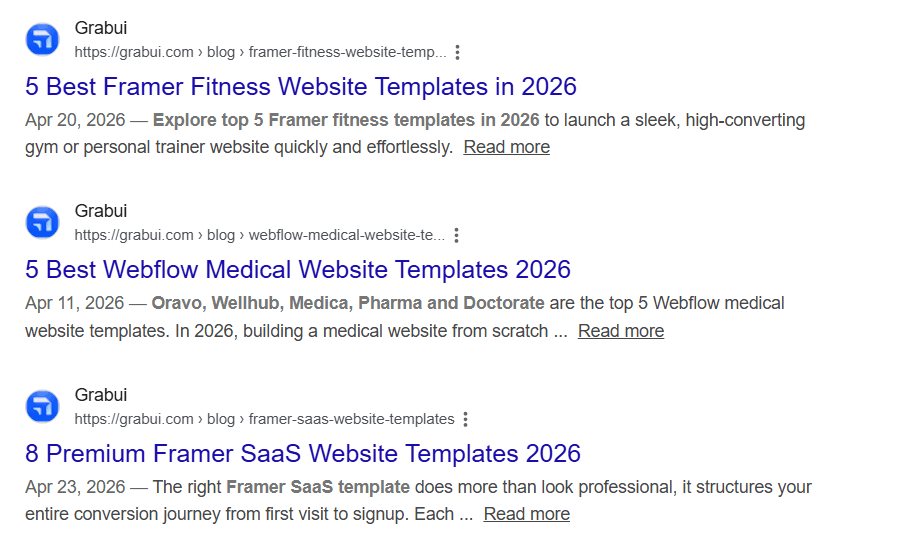
Meta descriptions won't bring you rankings in the SERP, but it can influence readers to evaluate your pages in the search results. A quality maintained meta description will explain your page value, include main keyword naturally, and persuade readers to click. Don't over promise in your meta descriptions nor even make it very generic or simple, tell honestly what's it about.
5. H1, H2, and H3 Structure
Remember, proper headings in your website content makes it easier for the readers to skim and scan, creating a logical content hierarchy. So, use your H1 for the page topic or what we call title, H2 for major sections and H3s for supporting points in the content.
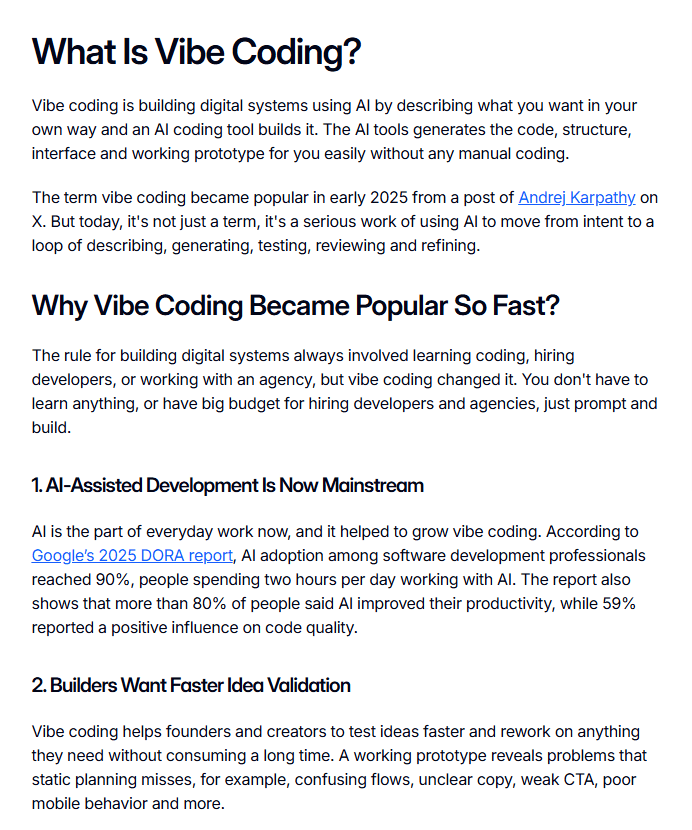
Check out this section of our blog for understanding how to write SEO optimized headings and subheadings.
6. Intro Section Optimization
The introduction part of your content is very essential, it must hook the readers to stay in the page or else bounce rate increases. Your introduction must confirm the topic quickly, address the problems of the readers and give direct answer, explaining what's coming up next.
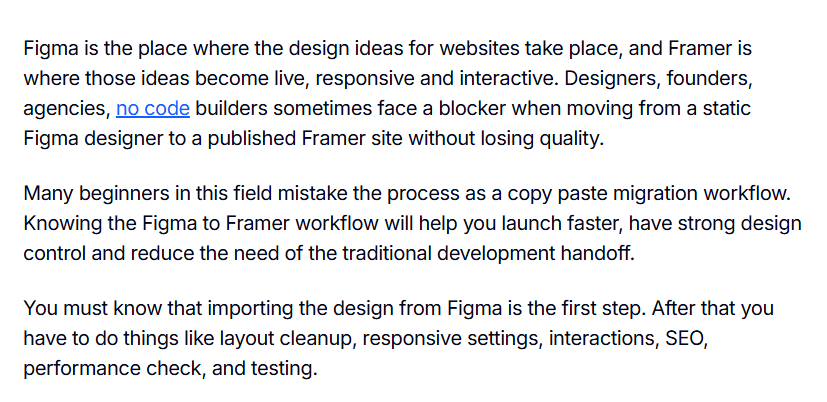
Check this introduction from the Figma to Framer migration blog, it talks about the pain points of the readers, answers and tells what's next. Try to use PAS formula for your blog introduction and keep it under 120 words, not more than that.
7. Main Blog Content Optimization
Your blog content must be useful, specific and helpful and highly researched investing time dedicatedly to understand the competitors. You must include clear explanations, step by step guide, images, screenshots, tables, internal and external links. Study E-E-A-T for writing content from your experience, expertise, authority, so that people can trust your website.
8. Internal & External Linking
Internal linking helps your audience to move across your website and helps search engines to discover and understand related pages. You can use internal linking to connect your blog with service pages for example, or link between related blog posts using descriptive anchor text.
And through external linking you hyperlink other domains to your content relevantly and logically. External linking provides a better context to the search engines to understand your content for indexing and also increase site trust and authority.
9. Image SEO
SEO in images of your websites also matters a lot, supporting both your users and search engines. Remember, to use descriptive filenames, meaningful alt text, compress your images, use correct dimensions and right formats. If you have a oversized screenshot in your blog, then compress them first, and place near the relevant text with caption. Your alt text should tell the meaning of the image, not just name it as, 'image'.
Off Page SEO for Webflow Websites
You can create an organized, fast and structured website but it can't automatically build you authority. Your website can have perfect technical SEO, and on page SEO but still struggle, for no references, recommendations or reviews from outside to trust your brand. People use off page SEO for earning external signals to show that the website is credible enough in its expertise.
And off page SEO matters a lot for traditional SERP rankings and AI visibility in today's world. It is clearly mentioned in E-E-A-T guidelines that search engines and AI systems look for signs outside your website to recognize your brand.
1. Backlinks
Quality backlinks from a relevant editorial link from a trusted website are the best off page SEO signals. You can get good backlink opportunities from guest contributions, digital PR, case studies, original research, tools, testimonials and more. Having your website getting a clickable link in a quality website gives you traffic, increase search rankings and establish authority.
2. Brand Mentions
Creating authority through off page SEO does not only mean having clickable backlinks from reputed websites. You must know that unlinked or even linked brand mentions in social media, communities, forums, podcasts, YouTube videos help you with off page SEO. Most importantly, these brand mentions in multiple platforms push LLMs to trust your brand and use it as reference in its answers.
AEO, GEO, and AI Visibility for Webflow Websites
The world is evolving every now and then, and AI industry is updating in the blink of an eye everyday. AI search has changed how people now discover information from websites in SERP but it has not replaced SEO. AEO, GEO and AI visibility should be treated as extensions of SEO only, not a separate thing.
What is AEO?
Answer engine optimization is the full form of AEO, which focuses on making a content clear and direct enough to answer questions straightforwardly. Means, you have to include clear definitions, direct answer blocks, FAQ section, thorough instructions, tables, original examples and summaries in your content.
What is GEO?
Generative engine optimization meaning GEO, it focuses on enhancing the probability that LLMs can understand, cite, or recommend your content. But you must remember, that no GEO methods can guarantee you AI citations or AI visibility. You must maintain your fundamental SEO technics to win in GEO, plus answer directly in short, maintain headings, original insights, author information and implement schemas.
You can use llms.txt, but remember it will act as an extra discoverability signal for AI systems only, but won't guarantee you indexing or rank. Also, remember to check that you have not mistakenly blocked AI bots in your llms.txt, or else they won't be able to crawl your websites.
FAQ
Can changing a Webflow page URL hurt SEO?
Yes, changing a URL without a proper 301 redirect can affect you with ranking, broken links, and even drops in traffic. So, if you update a slug, always redirect your old URL to the new relevant page and check Google Search Console for 404 errors.
Does Webflow animations bad for SEO?
Webflow animations are okay if you use them to improve user experience and not slow the page or hide important content. You might face SEO problems when your animations will increase load time, block mobile usability and make it hard for search engines to access.
3.How often should I audit a Webflow website for SEO?
You should audit your small Webflow website within every 3 to 6 months. But if you have a large Webflow website with larger CMS, ecommerce, or multilingual sites then audit it every month.
Final Words
Webflow is one of the most strongest website builders in the market right now, but it won't do the SEO work for you. It provides you flexible controls over SEO, but your ranking success will depend on your planning, content quality, technical accuracy, authority and optimization.
Before working on the SEO of your Webflow websites, you must understand E-E-A-T very well, and produce helpful content later. You focus on your audiences, make it easier for them to understand, maintain social media presence as well, Google will reward you.

Tarik Eamin
CEO @ Whiteframe Creative
I’m on a mission to build premium, production-ready design systems that help products look sharp and ship faster. At GrabUI, we share thoughtfully built templates, sections, wireframes, UI elements, icons, branding assets, and motion templates designed for real-world products, not just showcase screens. Through practical blog resources, we help you make better design decisions not just prettier screens.
Pro+
Upgrade to Grabui
Discover unlimited inspiration to help you Design fast. Build faster.

9000+ sections
Websites in minutes

Elements and icons
Complete design toolbox

Instant copy & paste
Works with your platform
Share this article on


